What Is an On-Premises EDMS (Electronic Document Management System)?
An Electronic Document Management System (EDMS) is software that manages the capture, storage, organization, retrieval, versioning, and control of digital documents across an organization. An on-premises EDMS is one that runs on servers and infrastructure your organization owns and operates — rather than being hosted by a third-party cloud provider and accessed via subscription.
The distinction matters enormously. With a cloud-based EDMS, your documents are stored on someone else's servers, managed under someone else's security policies, accessible to someone else's administrators, and subject to someone else's pricing decisions. With an on-premises EDMS, your documents stay on your own infrastructure — under your control, within your network, governed by your security framework.
LocalDMS is an on-premises EDMS built for organizations that value data sovereignty, predictable costs, and the operational certainty that comes with running document management on infrastructure they own. The Community Edition is free forever for teams of up to 10 users. Perpetual on-premises licenses start at $750.
The Core Advantages of an On-Premises EDMS
Complete Data Sovereignty
Your documents never leave your own servers. No cloud provider, no third-party administrator, no shared infrastructure. Version control, audit trails, and approval records are all stored exclusively on hardware you own and control.
Lower Long-Term Cost
A perpetual license is a one-time investment. Cloud subscriptions compound indefinitely — year after year, often with price increases. Over five years, the total cost of ownership of on-premises is typically a fraction of equivalent cloud spend.
Regulatory Compliance
Many regulatory frameworks — HIPAA, GDPR, SOX, sector-specific data residency rules — are more easily satisfied when data stays within your controlled infrastructure. On-premises deployment gives compliance officers clear, documentable answers about data location and access.
No Internet Dependency
An LocalDMS runs on your local network. Document access does not depend on internet connectivity. In environments where reliable internet is unavailable — remote sites, secure facilities, bandwidth-constrained offices — on-premises is the only practical choice.
Reduced Attack Surface
Cloud platforms are a high-value target for cyberattacks. Breaches at cloud providers can expose data from thousands of tenants simultaneously. An on-premises EDMS is accessible only within your network perimeter — dramatically reducing the external attack surface for your documents.
Full Operational Control
You control the backup schedule, the retention policy, the security configuration, and the upgrade timeline. No vendor can unilaterally change pricing, discontinue features, or modify the platform in ways that disrupt your workflows.
1. Data Sovereignty — Your Documents Stay on Your Servers
The most fundamental advantage of an on-premises EDMS is complete data sovereignty. When documents are stored in a cloud-hosted platform, the hosting provider has physical and logical access to your data — regardless of what their contract says about confidentiality. Their system administrators can access your files. Their infrastructure is subject to third-party audits, government subpoenas, and security incidents that are entirely outside your control.
For organizations handling confidential client information, proprietary intellectual property, regulated data, or sensitive business records, this is not an acceptable arrangement. The question "where is our data and who can access it?" must have a clear, documented answer — and "on a cloud provider's infrastructure, accessible to their staff" is not that answer for many regulated and security-conscious organizations.
With LocalDMS deployed on-premises, the answer is unambiguous: your documents are on your own server, in your own building or data center, accessible only through your own network and your own user authentication system. No third party has access. No vendor relationship creates a data access risk.
With LocalDMS on-premises, you can state with certainty: "Our documents are stored on servers we own, in a location we control, accessible only to users we authenticate, under security policies we define." That statement is impossible to make with cloud-hosted document management.
2. Total Cost of Ownership — Perpetual vs. Subscription
The financial case for self-hosted EDMS with perpetual licensing is compelling — particularly over a multi-year time horizon. Cloud EDMS platforms charge recurring fees that never stop. Every year, you pay again. Every year, those fees are subject to increase. Over five or ten years, the cumulative spend on a cloud subscription typically dwarfs the one-time cost of an on-premises perpetual license.
The Subscription Trap
Cloud EDMS platforms are priced to maximize recurring revenue. An organization that signs up for a $500/month cloud EDMS has spent $30,000 over five years — and still owns nothing. They cannot take the software with them if they leave. If the vendor raises prices, they pay more or lose access to their own documents. If the vendor is acquired, repriced, or shut down, the organization faces a forced migration under pressure.
The Perpetual License Advantage
A perpetual on-premises license is a capital investment, not an operating expense that never ends. LocalDMS Professional Edition — for up to 20 users — costs $750 once. Over five years, that is an effective annual cost of $150. Over ten years, $75. No cloud platform comes close to that cost profile. For small and mid-size organizations managing document costs carefully, the perpetual model is not just financially preferable — it is transformatively cheaper.
| Cost Component | LocalDMS On-Premises EDMS | Cloud EDMS Subscription |
|---|---|---|
| Initial license cost | $750 one-time (20 users) | $500–$2,000+/month |
| Year 1 total cost | $750 | $6,000–$24,000+ |
| Year 3 total cost | $750 (unchanged) | $18,000–$72,000+ |
| Year 5 total cost | $750 (unchanged) | $30,000–$120,000+ |
| Renewal required | ✓ Never — perpetual | ✗ Every year |
| Price increase risk | ✓ None — fixed forever | ✗ At vendor discretion |
| Access if you stop paying | ✓ Retained — you own it | ✗ Lost immediately |
3. Regulatory Compliance and Data Residency
Regulatory compliance is one of the most compelling arguments for on-premises EDMS deployment. A growing number of regulatory frameworks impose specific requirements on where data is stored, who can access it, and how access is controlled — requirements that are difficult or impossible to satisfy definitively with cloud-hosted platforms.
HIPAA and Healthcare Data
HIPAA's Security Rule requires covered entities and their business associates to implement technical safeguards protecting electronic Protected Health Information (ePHI) — including access controls, audit controls, and transmission security. While cloud platforms can be used for HIPAA-covered data under a Business Associate Agreement, an on-premises EDMS gives healthcare organizations direct, auditable control over every one of these requirements without dependence on a vendor's compliance attestations.
GDPR and Data Residency
GDPR imposes strict requirements on the transfer of personal data outside the European Economic Area. Organizations subject to GDPR that use cloud-hosted document management must carefully verify that their provider's data centers, backup locations, and disaster recovery sites all comply with data transfer restrictions. An on-premises EDMS eliminates this concern entirely — data stays where you put it.
SOX, SEC, and Financial Regulation
Sarbanes-Oxley and SEC regulations impose specific requirements on the integrity and accessibility of financial records. On-premises deployment with a perpetual, auditable system gives finance and compliance teams clear, documented answers to auditor questions about how records are stored, who can access them, and how changes are tracked.
With an on-premises EDMS, your compliance officer can answer every question about data location, access controls, and security configuration from direct, first-hand knowledge — not from a vendor's compliance documentation that may or may not reflect the current state of their platform.
4. Security — Reducing the Attack Surface
Cloud-hosted document management platforms are attractive targets for cyberattacks precisely because they store documents for thousands of organizations simultaneously. A successful breach of a major cloud EDMS provider can expose the documents of every customer on that platform — including yours. The history of cloud data breaches demonstrates that this is not a theoretical risk.
Network Isolation
An on-premises EDMS runs within your own network perimeter. Access to the system requires access to your network — which is controlled by your own firewall, VPN configuration, and network security policies. External attackers cannot reach the system without first penetrating your network perimeter. This dramatically reduces the attack surface compared to a cloud-hosted platform accessible via the public internet.
No Shared Infrastructure
Cloud platforms run on shared infrastructure — multiple tenants' data on the same physical hardware, in the same data centers, under the same administrative access. Even with logical separation, this creates exposure that does not exist with dedicated on-premises hardware. Your documents share nothing with any other organization's data.
Ransomware Resilience
Ransomware targeting cloud providers can encrypt or destroy customer data stored on their infrastructure. With an on-premises EDMS, your organization controls the backup strategy — including offline or air-gapped backups that ransomware cannot reach. Your recovery capability is entirely within your own control, not dependent on a vendor's disaster recovery procedures.
5. Performance and Availability Without Internet Dependency
Cloud-based document management requires a reliable, high-bandwidth internet connection for every document access. In environments where internet connectivity is unreliable, constrained, or deliberately restricted — remote construction sites, manufacturing facilities, secure government environments, branch offices in areas with poor connectivity — cloud-hosted EDMS is simply impractical.
An on-premises EDMS runs on the local network. Document access is as fast as your internal network — typically orders of magnitude faster than internet-based cloud access for large files. There is no latency introduced by internet routing, no performance degradation during peak usage times, and no downtime caused by the vendor's infrastructure failures. If your local network is up, your EDMS is up.
On a local network, LocalDMS serves documents at LAN speeds — typically 100Mbps to 10Gbps depending on your infrastructure. Large drawing files, high-resolution scans, and video files that would be painfully slow to access over cloud are instantly available on-premises.
6. Operational Control — No Vendor Surprises
Organizations that have committed to cloud-hosted document management are subject to whatever decisions their vendor makes. Price increases, feature removals, UI changes forced on all customers, changes to data retention policies, platform acquisitions that change the product direction — all of these have happened to cloud EDMS customers, and none of them are within the customer's control.
With an on-premises EDMS and a perpetual license, you own the software. The version you purchased continues to work regardless of what the vendor does subsequently. You upgrade on your own timeline. You configure the system to your requirements without being constrained by what a multi-tenant cloud platform can accommodate across its entire customer base. Your workflows, your folder structures, your access controls — all stable, all yours.
What a Modern On-Premises EDMS Includes
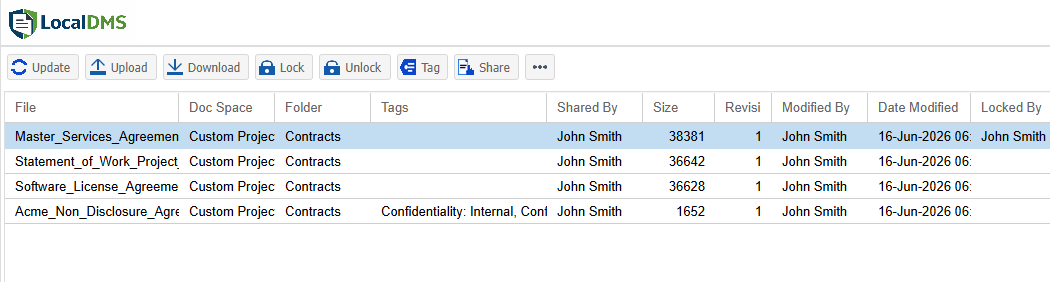
The misconception that self-hosted means outdated or feature-limited no longer holds. LocalDMS delivers a full-featured EDMS capability through a modern browser-based interface — accessible on any device on your network, without requiring software installation on each workstation.
- Centralized document repository — organized with folder structures, metadata, and tags
- Full version control — every revision tracked, every prior version retained and retrievable
- Full-text search — indexes document content, not just file names, for instant retrieval
- Review and approval workflows — structured routing with notifications and assignments
- Electronic sign-offs — timestamped approval records for every document
- Role-based security — granular access control by user, role, and Document Space
- Document Spaces — isolated, permission-controlled areas for different teams or sensitivity levels
- Complete audit trails — every access, edit, review, and approval logged with user identity and timestamp, meeting regulatory audit control requirements
- Categories and tags — multi-dimensional classification beyond folder location
- Browser-based interface — no client software required, accessible from any device on your network
On-Premises EDMS vs. Cloud Document Management: Full Feature & Cost Comparison
| Factor | On-Premises EDMS (LocalDMS) | Cloud EDMS Subscription |
|---|---|---|
| Data location | ✓ Your servers, your control | ✗ Vendor's data centers |
| Third-party data access | ✓ None | ✗ Vendor staff can access |
| Internet required | ✓ No — local network only | ✗ Yes — always |
| Perpetual licensing | ✓ One-time cost | ✗ Recurring subscription |
| 5-year TCO (20 users) | ✓ $750 total | ✗ $30,000–$120,000+ |
| Price increase risk | ✓ None | ✗ At vendor discretion |
| Data residency compliance | ✓ Guaranteed | Depends on vendor configuration |
| HIPAA/GDPR control | ✓ Direct control | Via BAA / vendor attestation |
| Attack surface | ✓ Internal network only | ✗ Public internet accessible |
| Backup control | ✓ Full control | Vendor-managed |
| Upgrade timeline | ✓ Your choice | ✗ Forced by vendor |
| Free tier | ✓ Free for up to 10 users | ✗ Rarely available |
| Implementation complexity | Server setup required | ✓ Immediate access |
| Remote/mobile access | VPN or hosted option | ✓ Any device, anywhere |
Who Should Choose an On-Premises EDMS
On-premises EDMS deployment is the right choice for organizations that meet one or more of the following criteria:
- Handle confidential, regulated, or sensitive data that must remain within controlled infrastructure
- Operate in regulated industries — healthcare, finance, legal, government — with data residency or security requirements
- Have limited or unreliable internet connectivity at their primary operating locations
- Want to minimize long-term technology costs through perpetual licensing over recurring subscriptions
- Require operational certainty — stable software, no forced updates, no vendor-driven changes to workflows
- Have an existing server infrastructure with capacity to host an EDMS workload
- Are subject to cybersecurity policies that restrict or prohibit storage of sensitive documents in third-party cloud environments
Getting Started with LocalDMS On-Premises EDMS
LocalDMS is an on-premises EDMS designed to be practical for organizations of any size. It runs on a Windows server, is accessed through any web browser on your network, and requires no client software installation on workstations. Deployment is straightforward — download the installer, run it on your server, and your EDMS is operational.
The Community Edition is free forever for up to 10 users — the right starting point for small teams, departments, or organizations evaluating on-premises document management without financial commitment. For growing organizations, perpetual licenses scale cleanly: $750 for up to 20 users, $3,000 for up to 50 users, and $5,000 for up to 250 users. Larger deployments can contact us for custom volume pricing. Pay once, own it forever.
For organizations that want on-premises document management capabilities without managing their own server infrastructure, LocalDMS also offers a hosted SaaS option — contact us for pricing.