The Document Management Stakes in Legal and Compliance
In legal practice and compliance work, documents are not just records — they are the work product itself. A matter file is the evidence of legal strategy. A compliance policy is the written commitment to a regulatory framework. A contract is the enforceable definition of a business relationship. How these documents are managed, versioned, secured, and retrieved is not a back-office concern — it is a professional and regulatory obligation.
The consequences of document management failures in legal and compliance contexts are severe. A lost document in litigation can result in sanctions for spoliation. An outdated compliance policy in effect at the time of an audit can constitute a regulatory violation. An unauthorized edit to a contract can create liability. These are not hypothetical risks — they are documented sources of professional exposure, regulatory penalties, and client harm.
Yet many law firms and compliance teams — particularly small and mid-size practices, boutique firms, and internal departments at non-enterprise organizations — manage their documents through shared drives, email threads, and informal filing conventions that provide none of the protection these professionals need.
LocalDMS provides a practical, affordable legal document management system for small law firms: a centralized document repository with version control, role-based security, full audit trails, and structured approval workflows — deployed as on-premise legal DMS software on servers you control, or as a self-hosted law firm document repository your firm already owns. It's free to start, for up to 10 users.
Key Legal and Compliance Document Management Use Cases
Matter File Management
Organize complete matter files — pleadings, correspondence, research, contracts, and evidence — in a structured, searchable repository with role-based access by matter.
Compliance Policy Library
Maintain a controlled library of compliance policies with version history, approval records, and distribution tracking — ready for regulatory audits at any time.
Privileged Document Control
Isolate attorney-client privileged communications and work product in access-restricted Document Spaces, ensuring privilege is never inadvertently compromised.
Policy Review & Approval
Route compliance policies, legal opinions, and regulatory filings through structured review and sign-off workflows with timestamped electronic approvals.
Regulatory Filing Records
Store regulatory submissions, correspondence with agencies, and response documentation in a chronologically organized, fully searchable repository.
Legal Hold & eDiscovery Support
Locate and retrieve documents responsive to legal holds or discovery requests instantly using full-text search across your entire document repository.
1. Matter File Organization and Legal Document Control
The foundation of effective legal practice management is an organized, accessible, and secure matter file system. In a shared drive environment, matter files grow organically — each attorney filing documents according to personal convention, with no enforced naming, no version tracking, and no audit trail of who accessed what and when. The result is inconsistency at best, and lost or compromised work product at worst.
Structured Matter Repositories
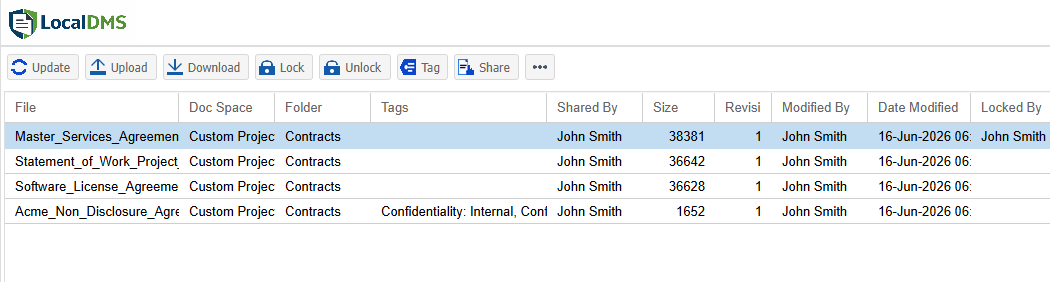
LocalDMS allows firms to create a consistent folder structure for every matter — pleadings, discovery, correspondence, research, contracts, evidence, billing — enforced across the entire practice. Every matter file follows the same organization, making it immediately navigable by any authorized attorney or staff member, not just the originating attorney.
Contract Management Software for Legal Departments
In-house legal departments and firms managing high volumes of client and vendor agreements need more than file storage — they need version-controlled contract lifecycle tracking, with a full history of every redline and an audit trail of every approval. LocalDMS provides this as part of the same document repository used for matter files, rather than requiring a separate contract management tool. See how contract management works in LocalDMS →
Version Control for Every Document
Every document in LocalDMS is versioned automatically. When a contract is negotiated, a brief is revised, or a policy is updated, the previous version is retained in full. The complete revision history is accessible at any time — who made each change, when, and what the document said at every prior point. For legal work product, this history is both a professional record and a potential litigation asset.
Role-Based Access by Matter
Conflict walls, privilege protection, and client confidentiality all require precise access controls. LocalDMS's Document Spaces allow each matter file to be isolated with its own permission set — only the attorneys and staff assigned to a matter can access its documents. Across a firm, this means each team works within their authorized scope without administrative complexity.
Privileged communications and attorney work product can be stored in dedicated Document Spaces accessible only to designated legal personnel — ensuring that privilege is never inadvertently waived through unauthorized access or disclosure.
2. Compliance Policy Management and Regulatory Documentation
For compliance professionals, the policy library is the core deliverable. Regulators — whether the SEC, DOJ, FTC, state bars, or industry-specific bodies — evaluate compliance programs largely through their documentation: Are policies current? Were they reviewed and approved on schedule? Can the organization demonstrate that staff had access to the policies in effect at the relevant time?
Version-Controlled Policy Library
Every compliance policy in LocalDMS is versioned automatically. When a policy is updated to reflect a regulatory change, a new version is created and the previous version is retained with its full approval record. Regulators can be shown exactly what policy was in effect on any date, who approved it, and when it was published — the complete documented history of your compliance program.
Structured Review and Approval Cycles
Compliance policies typically require annual or periodic review and approval by designated officers — the CCO, General Counsel, or Board. LocalDMS routes policies through defined review sequences with notifications and assignments, capturing electronic sign-offs at each stage. The result is a documented approval chain for every policy, every cycle — eliminating the common audit finding of "policy not reviewed in the required period."
Regulatory Filing and Correspondence Records
Store all regulatory submissions, agency correspondence, examination responses, and enforcement-related documentation in a chronologically organized repository. When a regulatory inquiry arrives, assembling the responsive record takes minutes rather than days of manual searching across email archives and shared drives.
LocalDMS maintains a complete record of every policy version, every approval, and every document access — so your compliance program is documentable on demand, not scrambled together the week before an examination.
3. Full Audit Trails — Non-Negotiable in Legal Practice
In legal and compliance contexts, the audit trail is not a convenience feature — it is a professional requirement. Whether the question arises in litigation, a bar complaint, a regulatory examination, or an internal investigation, the ability to demonstrate exactly who accessed, modified, approved, or disclosed a document is fundamental.
LocalDMS logs every document interaction — access, edit, version creation, review, approval, and sign-off — with the user identity and a precise timestamp. This creates a complete, unalterable record of document handling that can be produced in response to legal discovery, regulatory inquiries, or internal audit requests.
Responding to Legal Holds
When a legal hold is triggered, the immediate requirement is to identify, preserve, and prevent the alteration of relevant documents. LocalDMS's full-text search allows legal teams to identify potentially responsive documents across the entire repository within minutes. The audit trail demonstrates that documents were preserved in their original state from the date the hold was imposed — a critical showing in any litigation hold defense.
Supporting eDiscovery Requests
Responding to discovery requests requires the ability to search across documents, identify responsive materials, and produce them with a defensible chain of custody. LocalDMS's full-text search — which indexes the actual content of documents, not just file names — makes identifying responsive documents significantly faster than manual searching. The version history and audit log provide the chain of custody documentation that courts and parties expect.
LocalDMS never deletes prior document versions and never erases audit log entries. The complete documentary history of every file in your repository is maintained indefinitely — giving you a defensible record for any future inquiry.
4. Secure On-Premises Deployment for Confidential Legal Records
Legal documents contain some of the most sensitive information that exists — client confidences, litigation strategy, personal financial records, trade secrets, and privileged communications. Storing these documents in third-party cloud environments raises legitimate questions about data security, regulatory compliance, and professional responsibility obligations.
Many state bar associations and professional conduct rules require attorneys to take reasonable measures to protect client confidentiality in their technology choices. Increasingly, this means understanding where client data is stored, who can access it, and what security measures protect it — questions that are difficult to answer definitively with cloud-hosted platforms managed by third parties.
LocalDMS is built for on-premises deployment. Your documents are stored on your own Windows server, within your own network, under your own security policies. There is no third-party vendor with access to your client files or privileged communications. You control access, you control backups, and you control retention — giving you clear, documented answers to every question about where your client data lives and who can reach it.
Client files, privileged communications, and compliance records never leave your own infrastructure. No third-party cloud vendor, no shared hosting environment — just your documents, on your servers, under your control.
5. Affordable Legal Document Management — Without Enterprise Pricing
Enterprise legal document management platforms — iManage, NetDocuments, OpenText eDOCS — are powerful systems built for large law firms and corporate legal departments with correspondingly large IT budgets. For small and mid-size firms, boutique practices, solo practitioners with staff, and in-house legal teams at non-enterprise companies, those platforms are financially out of reach.
LocalDMS delivers the core legal document management capabilities that most organizations actually need — version control, role-based security, full-text search, audit trails, and approval workflows — at a price that makes deployment practical for any team:
All licenses are perpetual — pay once, own it forever. No annual renewal fees, no per-user monthly charges. For a small law firm with 10 or fewer timekeepers, the Community Edition is completely free. For a 20-person compliance department, the one-time $750 Professional license costs less than a single month of an enterprise legal DMS subscription.
LocalDMS vs. Enterprise Legal Document Management Platforms
Firms researching an affordable iManage alternative are usually weighing the same trade-off: enterprise legal DMS platforms like iManage and NetDocuments are built for Am Law 200 firms, with custom, sales-led pricing that industry estimates place between $50 and $167 per user per month — often more capability, and more cost, than a small or mid-size practice actually needs. LocalDMS covers the same core document control at a fraction of the price.
| Capability | LocalDMS | Enterprise Legal DMS (iManage, NetDocuments) |
|---|---|---|
| Free tier | ✓ Free for up to 10 users | ✗ No free tier |
| Perpetual license | ✓ One-time, no renewals | ✗ Annual subscription |
| On-premises deployment | ✓ Primary deployment model | Available at significant extra cost |
| Version control | ✓ Included | ✓ Included |
| Full audit trail | ✓ Included | ✓ Included |
| Role-based access | ✓ Included | ✓ Included |
| Full-text search | ✓ Included | ✓ Included |
| Approval workflows | ✓ Included | ✓ Included |
| Practice management integration | ✗ Not included | ✓ Deep integrations |
| Email filing integration | ✗ Manual filing | ✓ Outlook integration |
| Entry-level annual cost | ✓ $0–$750 one-time | ✗ $5,000–$50,000+/year |
Who Uses LocalDMS for Legal and Compliance Document Management
- Small and mid-size law firms organizing matter files, client documents, and administrative records without enterprise IT infrastructure
- Solo practitioners and small practices managing client files, correspondence, and contracts in a structured, searchable system
- In-house legal departments at non-enterprise companies managing contracts, compliance policies, and corporate governance records
- Compliance departments maintaining regulatory policy libraries, audit records, and examination response documentation
- Corporate secretarial functions organizing board resolutions, governance documents, entity records, and minute books
- Risk management teams managing risk registers, incident reports, investigation records, and remediation documentation
- Government and public sector legal offices managing records under open records and FOIA obligations
- Legal operations teams organizing matter portfolios, vendor contracts, and outside counsel management documentation
Getting Started with Legal Document Management
LocalDMS is available immediately — no sales process required for the Community Edition. Download the installer, deploy it on your Windows server, build your matter file structure, and your team can begin organizing documents the same day. For small firms and compliance teams of 10 or fewer, the Community Edition provides all core capabilities at no cost, indefinitely.
For larger teams, perpetual on-premises licenses start at $750 for up to 20 users. For firms or departments requiring a hosted option, contact us for SaaS pricing. To see how LocalDMS would work for your specific practice or compliance program, request a demo and we will walk through your use case directly.