The Document Management Challenge in Healthcare
Healthcare organizations manage an extraordinary volume of documents — clinical policies and procedures, credentialing files, accreditation records, staff training documentation, vendor contracts, consent forms, compliance reports, and administrative records. Unlike most industries, healthcare operates under some of the strictest documentation requirements in any sector, driven by HIPAA, the Joint Commission, CMS, and a patchwork of state-level regulations.
At the center of it all is the requirement to protect Protected Health Information (PHI). A document management system that stores files in a third-party cloud environment creates immediate questions about who controls access to that data, where it physically resides, and what happens in the event of a breach. For healthcare organizations, these are not abstract concerns — a single HIPAA violation can result in fines ranging from $100 to $50,000 per violation, with annual caps reaching $1.9 million per violation category.
At the same time, many healthcare organizations — particularly independent practices, community health centers, specialty clinics, and long-term care facilities — operate under tight budget constraints. Enterprise document management systems built for large hospital networks are simply not priced for organizations of this size.
LocalDMS addresses both problems: enterprise-grade document control, deployed on your own servers, at a price that works for organizations of any size — including a genuinely free edition for teams of up to 10 users.
Key Healthcare Document Management Use Cases
Clinical Policies & Procedures
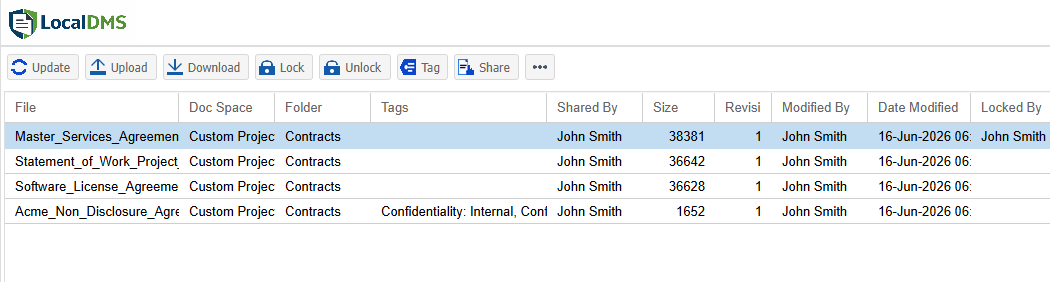
Maintain a controlled library of clinical policies with version history, approval records, and distribution tracking — essential for Joint Commission and CMS surveys.
Credentialing & Privileging
Organize provider credentialing files, license copies, DEA certificates, malpractice documentation, and privilege approvals in a structured, searchable repository.
Review & Approval Workflows
Route policy revisions, clinical protocols, and compliance documents for structured review and sign-off with timestamped electronic approvals.
Accreditation Documentation
Maintain organized, audit-ready accreditation document sets for The Joint Commission, DNV, AAAHC, or CMS Conditions of Participation surveys.
Staff Training & Competency Records
Store training materials, competency assessments, orientation documents, and annual compliance certifications with version control and access tracking.
HIPAA & Compliance Records
Securely manage HIPAA policies, breach notification records, Business Associate Agreements (BAAs), and risk assessment documentation with role-based access.
1. Ironclad Security and HIPAA Compliance
Healthcare is one of the most heavily regulated industries in the world, with HIPAA mandating stringent protections for electronic Protected Health Information (ePHI). The costs of failure are enormous — data breaches, compliance fines up to $50,000 per violation, and compromised patient trust that can take years to rebuild. LocalDMS's on-premises deployment model directly addresses these concerns.
Full Data Sovereignty — ePHI Never Leaves Your Infrastructure
With LocalDMS deployed on-premises, documents never leave your own Windows server infrastructure. This gives healthcare organizations complete control over security, access, and backups — critical for complying with HIPAA's Security Rule and ensuring patient privacy. There is no cloud provider holding encryption keys to your files, and no third-party system administrator who can access your records. For compliance officers and IT directors who need certainty about where ePHI resides, on-premises deployment is the clearest answer.
LocalDMS's on-premises deployment model supports your organization's ability to control ePHI access and maintain audit trails consistent with HIPAA's Security Rule. Organizations should consult their compliance officer or legal counsel to ensure their full HIPAA compliance program is in place.
Role-Based Access Control (RBAC)
LocalDMS includes granular role-based permissions to ensure only authorized personnel can access sensitive patient records and compliance documents. This directly aligns with HIPAA's requirement to grant access only to those with specific authorization. Document Spaces — separate, permission-controlled areas within the repository — allow HR records, credentialing files, clinical protocols, and administrative forms to each carry their own precise access boundaries, enforced consistently whether staff are working on-site or remotely.
Audit Trails and Accountability
LocalDMS provides electronic sign-offs and full revision history tracking — essential for meeting HIPAA's Audit Controls requirement, which mandates mechanisms to record and examine activity in information systems containing ePHI. Every document access, edit, review, and approval is logged with a timestamp and user record. When an accreditation surveyor or compliance auditor asks who reviewed a policy, who approved it, and when it was last updated, that information is immediately retrievable — turning what could be a stressful audit into a straightforward records review.
LocalDMS maintains a complete, retrievable record of who reviewed, edited, approved, and accessed every document — giving your organization a defensible audit trail for Joint Commission, CMS, DNV, and other accreditation surveys.
2. Streamlining Clinical Workflows and Improving Patient Care
Hospitals and clinics are drowning in paperwork — patient intake forms, consent documents, lab results, medical histories, insurance claims, clinical protocols, and referral documentation. Manual management of these documents is not only inefficient but can directly delay care. A robust document management system is no longer a luxury in healthcare — it is a necessity.
Eliminating the Paper Chase
Without a centralized DMS, clinical and administrative staff spend significant time searching for the right document across shared drives, email threads, and filing cabinets. LocalDMS centralizes all documents in a single, searchable repository — making them instantly available to authorized users. In a healthcare setting, the difference between finding a consent form in seconds versus minutes can be clinically meaningful. Full-text search indexes document content, not just file names, so any keyword, patient-related term, or policy topic returns results immediately.
Accelerating Critical Processes
Structured review and approval workflows with electronic sign-offs speed up processes like obtaining patient consents, processing referrals, approving clinical protocols, and finalizing compliance documentation. Real-world healthcare implementations have demonstrated that a well-deployed DMS can make 95% of scanned documents and signed patient consents available to all authorized users within 24 hours — a dramatic improvement over manual paper-based processes.
Reducing Errors That Affect Patient Safety
When documents are digitized and integrated into a structured workflow, it reduces the risk of misfiling, losing critical information, or staff acting on outdated records. Patients benefit from a more connected care experience where all relevant documentation — medical history, consent status, lab results, referral notes — is available to their care team in the current, approved version. Version control ensures that an outdated clinical protocol is never mistakenly followed in place of the current one.
LocalDMS runs entirely on your own infrastructure. Your clinical documents and ePHI never leave your network — making it the right fit for healthcare organizations with strict data residency requirements or cloud-restriction policies.
3. Managing Clinical Policies and Accreditation Requirements
For most healthcare organizations, policy and procedure management is the single highest-stakes document management challenge. Accreditation bodies require that policies be current, reviewed on a defined schedule, approved by appropriate leadership, and accessible to staff. Demonstrating all of this during a survey — often with little advance notice — requires a system, not a shared drive.
Version Control Across Every Policy
Every clinical policy and administrative procedure in LocalDMS is versioned automatically. When a policy is revised, the previous version is retained in full with its complete revision history. Staff always access the current approved version, and surveyors can see exactly what version was in effect on any given date. No more manually tracking revision dates in spreadsheets, and no more uncertainty about whether the binder on a unit shelf is current.
Structured Review and Approval Workflows
Many healthcare policies require review and approval by specific individuals before they take effect — a clinical protocol may require sign-off from the medical director, a nursing procedure from the CNO, a compliance policy from the compliance officer. LocalDMS routes documents through defined review sequences with notifications and assignments, creating an electronic sign-off record for every step. The result is a complete, timestamped approval chain for every document in your library.
Searchable Policy Library
Any staff member with appropriate access can find the policy they need in seconds — by keyword, topic, department, or document title. No more calls to the compliance office. No more pulling binders off shelves. The right policy, immediately available, to the right person.
4. Credentialing and Provider File Management
Credentialing is one of the most document-intensive processes in healthcare administration. Each provider file typically contains dozens of documents: medical school diploma, residency certificates, board certification, state licenses, DEA registration, malpractice insurance certificates, peer references, and privilege approval records — all of which must be collected, verified, organized, and periodically re-verified.
LocalDMS provides a structured repository where each provider's credentialing file can be organized with folder structures, metadata tags, and expiration-date tracking. Role-based access ensures that credentialing staff can manage these files while clinical staff and administrators see only what they are authorized to view. Version control means that every license renewal or certificate update creates a new document version rather than overwriting the prior one — preserving the historical record that medical staff offices require.
5. Disaster Recovery and Business Continuity
Healthcare operations cannot tolerate document loss. Clinical policies, credentialing records, and compliance documentation are not replaceable from memory — they represent years of organizational work and are legally required for ongoing operations and regulatory standing. Cyberattacks — particularly ransomware — represent a growing and specific threat to healthcare organizations, with the sector consistently ranking among the most targeted by ransomware actors.
LocalDMS's on-premises deployment gives your organization complete control over backup strategy and data redundancy. You define the backup schedule, the storage location, and the recovery procedure. In the event of a hardware failure, ransomware attack, or natural disaster, your document repository can be restored from your own backups without dependence on a third-party vendor's recovery timeline or availability. Digital copies stored in LocalDMS can be produced as reference to originals and retrieved quickly to minimize business disruption and maintain continuity of care.
Because LocalDMS runs on your own infrastructure, your organization defines and controls the entire backup and recovery process — critical for healthcare organizations that cannot afford document loss, ransomware exposure, or extended system downtime.
6. An Unbeatable Cost Advantage in a Budget-Conscious Industry
Healthcare margins are often thin, and IT budgets are under constant scrutiny. Large health systems have signed DMS agreements exceeding $6.9 million over five years. For the vast majority of healthcare organizations — independent practices, community clinics, long-term care facilities, behavioral health providers — that level of investment is simply not an option.
LocalDMS offers a dramatically different model: enterprise-grade document management capabilities at a price that works for any size organization, with no recurring fees:
All licenses are perpetual — pay once, own it forever. No required renewal, no per-user monthly charges — an optional 10% annual maintenance plan keeps you on the latest version. For a small clinic or compliance team of 10 or fewer, the Community Edition is completely free — indefinitely. For a mid-sized organization managing 20 staff, the one-time $750 Professional license delivers what a comparable SaaS platform would charge annually, every year — with no end in sight. Compared to the $6.9 million five-year agreements signed by large health systems, LocalDMS represents a fundamentally smarter investment for organizations that need the capabilities without the enterprise price tag.
7. Complementing Your EHR/EMR System
LocalDMS is not a replacement for your primary Electronic Health Record or Electronic Medical Record system — it's built to sit alongside one. Most EHR/EMR platforms are designed around structured clinical data, not the large volume of unstructured documents a practice also has to manage: scanned intake forms, legacy paper charts from before your current EHR was adopted, external specialist reports and referral letters, signed consent forms, and administrative paperwork that doesn't fit neatly into clinical data fields.
LocalDMS gives that unstructured document layer the same version control, access control, and audit trail as the rest of your compliance documentation — searchable and organized, on the same on-premises infrastructure, without needing to force scanned paperwork into a data model it was never designed for.
Who Uses LocalDMS for Healthcare Document Management
- Hospitals and health systems managing clinical policies, accreditation documentation, and administrative records across departments
- Independent medical practices organizing credentialing files, compliance records, and patient-related administrative documents
- Community health centers (FQHCs) managing HRSA compliance documentation, policies, and staff training records
- Long-term care and skilled nursing facilities maintaining state survey documentation, care policies, and staff competency records
- Ambulatory surgery centers (ASCs) managing accreditation records, surgical protocols, and infection control policies
- Behavioral health organizations organizing clinical protocols, licensing records, and compliance documentation
- Medical staffing and credentialing offices maintaining provider files, privilege records, and re-credentialing documentation
- Healthcare management companies managing multi-site policy libraries, vendor contracts, and compliance records
LocalDMS vs. Expensive Enterprise Healthcare DMS Platforms
| Capability | LocalDMS | Typical Enterprise Healthcare DMS |
|---|---|---|
| Free tier available | ✓ Free for up to 10 users | ✗ No free tier |
| Perpetual license option | ✓ One-time fee, no renewals | ✗ Annual subscription |
| On-premises deployment | ✓ Primary deployment model | Sometimes available, usually at extra cost |
| No third-party cloud access to PHI | ✓ Your servers, your control | ✗ Vendor hosts your data |
| Version control | ✓ Included | ✓ Included |
| Approval workflows | ✓ Included | ✓ Included |
| Full-text search | ✓ Included | ✓ Included |
| Role-based security | ✓ Included | ✓ Included |
| Audit trail | ✓ Included | ✓ Included |
| Entry-level cost | ✓ $0 (Community) / $750 (Professional) | ✗ Typically $5,000–$30,000+/year |
Getting Started with Healthcare Document Management
LocalDMS delivers what healthcare organizations need: enterprise-grade document management with security, version control, role-based permissions, and audit trails — at a fraction of the cost of competing platforms. The free Community Edition is a perfect starting point for small clinics, independent practices, and compliance teams. For larger organizations, perpetual licenses scale affordably without locking you into expensive recurring subscriptions that drain resources from patient care.
No sales process is required to get started. Download the installer, deploy on your Windows server, and your team can begin organizing documents the same day. For multi-site health systems or organizations requiring a hosted option, contact us for SaaS pricing. If you would like to see LocalDMS applied to your specific workflows before committing, request a demo and we will walk through your use case directly.