The Document Challenge in Local Government
A local government office generates a steady stream of documents that have to be organized, retrievable, and defensible — meeting minutes and resolutions, permits and inspection files, contracts and RFP responses, personnel records, budget documentation, and correspondence. Unlike a private business, a local government office also has to assume that any of these documents could be requested by a resident, examined during an audit, or referenced years later in a dispute.
Most offices manage this with a mix of shared network drives, filing cabinets, and whatever structure the current clerk or department head happens to maintain. It works, until someone leaves, a file gets misplaced, or a records request comes in for a document nobody can immediately locate. The problem isn't a lack of effort — it's that general-purpose enterprise document platforms are priced and built for large state agencies and corporations, not for a municipal office running on a fixed annual budget and a lean IT team, regardless of how many staff it eventually needs to support.
LocalDMS was not built specifically for government, but its core strengths — on-premises deployment, straightforward setup, and a genuinely affordable perpetual license — map directly onto what a local government office actually needs: control over where records live, and a system that doesn't require a procurement process or a dedicated IT department to run.
Key Local Government Document Use Cases
Council & Board Records
Store meeting minutes, resolutions, and ordinances with full version history — so the current, adopted version is always clear and prior drafts remain on record.
Permits & Licensing Files
Keep permit applications, inspection reports, and approvals organized by property, applicant, or department, and searchable by keyword.
Contracts & RFP Documentation
Track vendor contracts, bid responses, and procurement records with approval workflows so the right people sign off before a contract is finalized.
HR & Personnel Records
Restrict personnel files to authorized staff only, with an audit trail of exactly who accessed or modified each record and when.
1. Meeting Minutes, Resolutions & Ordinances
Council and board records are read and referenced long after they're written — by staff confirming what was actually approved, by residents researching a past decision, and occasionally by attorneys or auditors. LocalDMS keeps every draft and every adopted version of a resolution or ordinance under version control, so it's always clear which version is current and what changed between drafts.
A Clear Version History
Instead of multiple copies of "Resolution 2026-14" floating between email and a shared drive, LocalDMS maintains one record with a complete version history. Anyone with access can see who made a change, when, and what the document looked like at any prior point.
When a resident or attorney asks "what did the board actually approve," staff can pull the exact adopted version — not guess which copy in a shared folder is current.
2. Permits, Licensing & Inspection Records
Permit files accumulate documents over time — the original application, supporting drawings, inspection reports, and the final approval or denial. LocalDMS lets an office organize these by property, permit number, or applicant, with full-text search across the file so staff can find a specific permit without knowing exactly where it was filed.
Searchable Across Departments
Building, zoning, and code enforcement staff working from the same repository can find related records for a property without calling around to see who has the file. Role-based access keeps sensitive records limited to the staff who need them.
3. Contracts, RFPs & Procurement Documentation
Vendor contracts and procurement files need to be retrievable well after a contract is signed — for renewal decisions, disputes, or budget reviews. LocalDMS's approval workflows let a contract move through review and sign-off with an electronic record of who approved it, replacing a paper routing slip or an email chain that's easy to lose track of.
An Approval Trail That Holds Up
Every approval is logged against the specific document version, so if a question comes up later about who signed off on a contract or an RFP award, the answer is in the system — not in someone's inbox from eighteen months ago.
4. HR & Personnel Files
Personnel records are among the most sensitive documents any office holds, and they need to be restricted to the staff who are authorized to see them. LocalDMS's role-based permissions let an office limit personnel files to HR and department heads, while the audit trail records every access — useful if a records request or internal question ever comes up about who viewed a file.
Permissions in LocalDMS are enforced by the system, not by an honor code about who's "supposed to" open a folder on a shared drive.
5. Affordable Document Management for a Municipal Budget
Enterprise document and records platforms marketed to government are frequently priced for state agencies and large counties — annual subscriptions, per-user fees, and implementation costs that a municipal budget can't absorb. LocalDMS takes a different approach:
All licenses are perpetual — pay once, own it forever. There is no required annual renewal and no per-user monthly charge to justify at next year's budget hearing. Optionally, a 10% annual maintenance plan keeps an office on the latest version and new features — entirely opt-in, and skippable in any year the budget doesn't allow for it. A five-person clerk's office runs on the Community Edition at no cost. A county department with 15 staff pays a one-time $750 for the Professional license. A larger county department or multi-office municipality scaling to hundreds of staff can license the Corporate edition for up to 250 users at a one-time $5,000, with custom Enterprise pricing for larger, multi-department deployments — still a fraction of typical government platform costs, and a figure most municipal budgets can approve without a lengthy procurement cycle.
LocalDMS does not currently hold FedRAMP, StateRAMP, or CJIS certification. If your office is required to procure only from a certified or state-approved vendor list, confirm that requirement before purchasing. LocalDMS scales from a handful of users to large multi-department deployments under the Corporate and Enterprise editions — the limitation here is certification, not size — so it best suits municipal and county offices, departments, and districts of any size that are not bound by those specific mandates.
6. Easy for Staff to Adopt — Minimal Training Required
Local government offices don't always have the luxury of extended training budgets or a dedicated onboarding program. Clerk and permit office staff turn over, seasonal and part-time employees rotate through, and elected board members change every election cycle. A document system that takes weeks to learn becomes a system that half the office quietly avoids and keeps working around with email and shared drives.
LocalDMS uses a browser-based interface built around concepts most office staff already know — folders, upload, search, check out, approve. Someone comfortable with everyday office software is typically productive within their first day, without a formal training course or a support contract required to get them there.
When a new clerk starts or a newly elected board member needs access, getting them up to speed is usually a short walkthrough — not a scheduled training session.
Who Uses LocalDMS in Local Government
- Town and city clerk offices organizing council minutes, resolutions, ordinances, and public correspondence
- County departments managing permits, licensing files, and inter-department records
- Special districts — water, fire, library, and utility districts — maintaining board records and operational documentation
- Municipal and county HR departments organizing personnel files with restricted, auditable access
- Planning and zoning offices managing permit applications, site plans, and inspection records
- Procurement and finance offices tracking vendor contracts, RFPs, and budget documentation
- Parks, recreation, and facilities departments organizing contracts, maintenance records, and vendor agreements
Getting Started
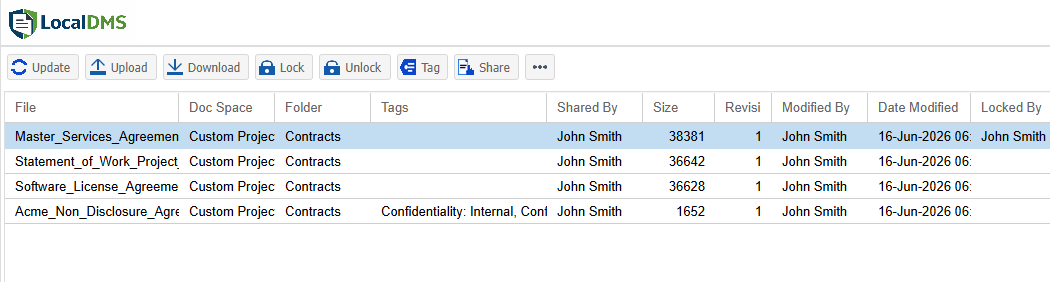
LocalDMS is available immediately — no sales process required for the Community Edition. Download the installer, deploy it on your office's Windows server, set up a folder structure for council records, permits, contracts, and personnel files, and staff can begin using it the same day.
For larger departments, perpetual on-premises licenses start at $750 for up to 20 users and scale to $5,000 for up to 250 users, with custom Enterprise pricing beyond that — the same one-time pricing model whether your office has 5 staff or 500. If you're not sure whether LocalDMS fits your office's specific records requirements — including whether your procurement rules require a certified vendor — request a demo and we'll walk through it directly.