The Document Challenge for Small Businesses
A small business handles a surprising volume of documents once you count everything — client contracts, invoices, vendor agreements, HR paperwork, internal policies, and correspondence. Most of it starts out fine in email attachments and shared folders. Then a contract gets buried in someone's inbox, an old invoice template gets used by mistake, or a new hire's paperwork is scattered across three different people's laptops.
The tools that solve this properly — enterprise document management platforms — are usually priced and built for companies with a dedicated IT department and a six-figure software budget. A five- or fifteen-person business doesn't have either of those, and doesn't need most of what those platforms offer. What it needs is version control, a clear approval trail, and a place to store documents that isn't "whoever has the latest copy in their downloads folder."
LocalDMS was built around exactly that gap: real document control — version history, audit trails, approval workflows, and built-in electronic signatures — without the enterprise price tag or the IT project.
Key Small Business Document Use Cases
Contracts & Client Agreements
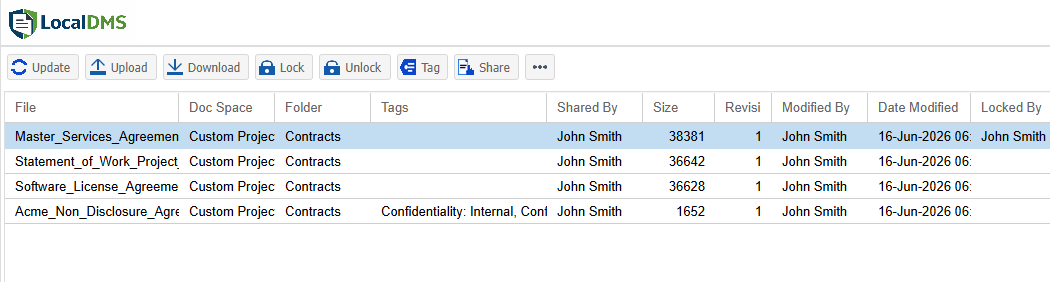
Store client contracts and vendor agreements with version history and built-in electronic signature capture — no separate e-signature subscription needed.
Invoices & Financial Records
Keep invoices, receipts, and financial documents organized and searchable, with access limited to the people who should see them.
HR & Onboarding Files
Store employee records and onboarding paperwork with role-based access, so sensitive HR files stay restricted to the people authorized to see them.
Policies & Internal Documentation
Maintain a single current version of company policies and procedures, with a clear history of what changed and when.
Secure Contract Management & Built-In E-Signatures
Contracts are usually the most consequential documents a small business has — and the easiest to lose track of. LocalDMS keeps every version of a contract under version control, so it's always clear which draft is current and what changed between rounds of negotiation.
Built-In Electronic Signatures
When a contract is ready, LocalDMS captures a signature directly as part of the approval step — a drawn signature plus a re-authentication check, logged with the signer's identity and a timestamp. There's no need for a separate e-signature subscription just to get a client's sign-off on an agreement.
Instead of searching email threads to find which version of an agreement was actually signed, staff can pull the exact signed version from LocalDMS in seconds.
2. Invoices, Receipts & Financial Records
Stop wasting time hunting through folders and email threads for an old invoice or receipt. Financial documents need to be retrievable long after they're created — for tax season, for a client dispute, or for a simple "did we already invoice this" question. LocalDMS's full-text search retrieves any document in seconds by typing a keyword, client name, or dollar amount, without knowing which folder it was filed in.
Access Limited to Who Needs It
Role-based permissions mean financial records can be restricted to the owner, bookkeeper, or accounting staff — not visible to everyone with access to the shared drive.
3. HR, Onboarding & Employee Files
Employee records are sensitive by nature, and a small business rarely has a formal HR system to manage them properly. LocalDMS lets you restrict personnel files to the people authorized to see them, with an audit trail recording exactly who accessed or modified a file and when.
Permissions in LocalDMS are enforced by the system, not by an informal understanding of who's "supposed to" open a folder on a shared drive.
4. Policies, SOPs & Internal Documentation
As a small business grows, informal knowledge — "ask Sarah how we handle returns" — stops scaling. LocalDMS gives you a place to document policies and procedures with version control, so there's always one current, findable version instead of three different copies with different edits.
LocalDMS Pricing: Perpetual License with No Monthly SaaS Fees
Enterprise document management platforms are frequently priced assuming a large company with a dedicated software budget — annual subscriptions, per-user fees, and implementation costs that make no sense for a business with a handful of employees. LocalDMS takes a different approach:
All licenses are perpetual — pay once, own it forever. There is no required annual renewal and no per-user monthly charge. Optionally, a 10% annual maintenance plan keeps you on the latest version and new features — entirely opt-in, and skippable in any year the budget doesn't allow for it. A solo consultant or a five-person team runs on the Community Edition at no cost. A growing business of 15–20 people pays a one-time $750 — often less than a single month of a typical per-user SaaS subscription.
6. Zero IT Required: Easy for Small Teams to Adopt
You don't need an IT department or specialized training to deploy real document control. LocalDMS is built for the busy business owner or office manager who is already balancing multiple roles.
Where Does It Actually Run? (No Cloud Required)
You don't need cloud infrastructure expertise or a dedicated server room. LocalDMS installs directly on any existing Windows PC or Windows Server your business already owns.
- Simple Setup: Choose any standard Windows desktop or laptop that stays powered on and connected to your local office network.
- Instant Repository: Run the 5-minute installer, and that machine becomes your central document repository.
- Seamless Access: Everyone else on your team connects to that host machine through their web browser.
No Software to Roll Out Machine-by-Machine
Because LocalDMS is 100% browser-based, there is no client software or apps to manually install or update on individual laptops.
- Browser Compatible: Staff log in using Chrome, Edge, or Safari — the browsers they already use daily.
- No Special Training Required: Staff start organizing files without a manual or a formal training session.
- Instant Onboarding: A new hire's laptop is ready the moment you create their login — no IT tickets or installation delays.
Who Uses LocalDMS as a Small Business
- Consulting and professional services firms managing client contracts, deliverables, and correspondence
- Marketing and creative agencies organizing client agreements, project files, and approval sign-offs
- Small retailers and e-commerce businesses tracking vendor agreements, invoices, and supplier documentation
- Property management and real estate offices storing leases, agreements, and tenant records
- Nonprofits and small associations managing board documents, grant paperwork, and policies
- Bookkeeping and small accounting practices organizing client financial records with restricted access
- Any growing team that has outgrown shared folders and email attachments as a filing system
Getting Started
LocalDMS is available immediately — no sales process required for the Community Edition. Download the installer, deploy it on a server or workstation your business already has, and start organizing contracts, invoices, and HR files the same day.
If your team is growing past 10 users, perpetual on-premises licenses start at $750 for up to 20 users — the same one-time pricing model whether you're a 5-person shop or a 50-person company. If you're not sure whether LocalDMS fits how your business works, request a demo and we'll walk through it directly.