LocalDMS FeaturesEverything you need to control documents. Nothing you don’t.
LocalDMS gives your team version control, approvals, audit history, permissions, search, and secure sharing in one straightforward document management system — on-premises or hosted.
01 · Control
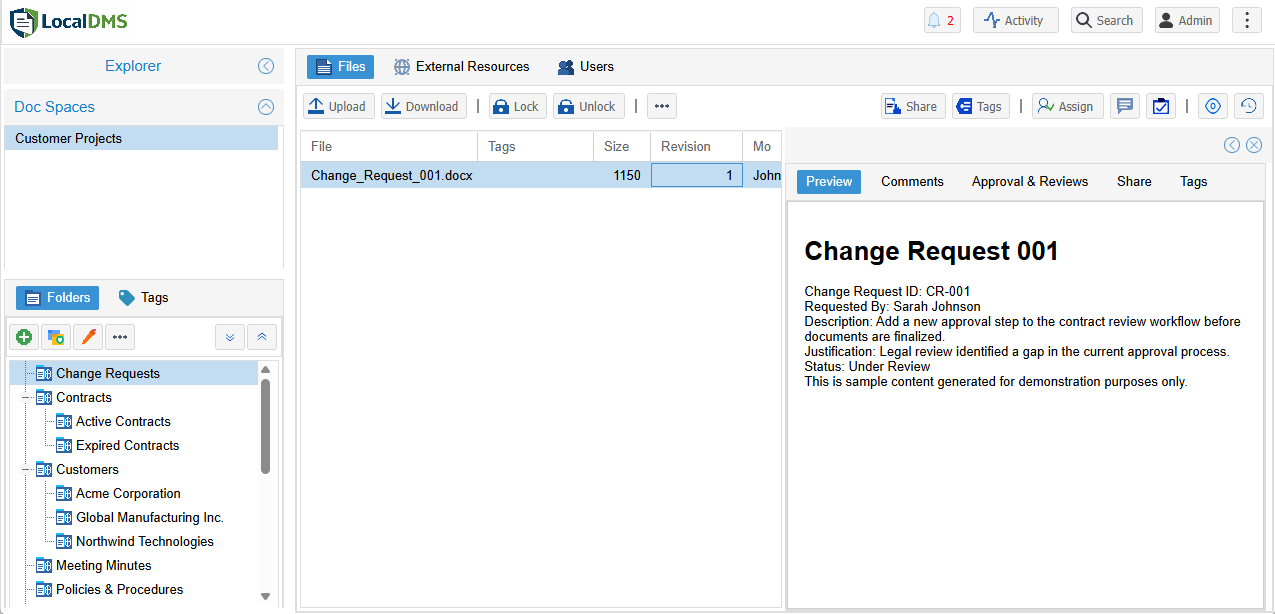
Keep every file under control
LocalDMS adds structure to everyday file work without forcing users into a complicated records system.
- Automatic revision history keeps earlier versions available.
- Check-in / check-out helps prevent conflicting edits.
- Document Spaces and folders separate teams, clients, and projects.
- Tags and metadata make documents easier to classify and retrieve.
02 · Workflow
Move reviews and approvals forward
Keep assignments, comments, review decisions, and approval evidence connected to the document instead of scattered through email.
- Review, approval, and task assignments with optional due dates.
- Approval history by revision so sign-off stays tied to the exact file version.
- Signature and re-authentication during approval where required.
- Notifications and comments keep users aware of what needs attention.
03 · Find
Find the right document without hunting through folders
Search is useful only when it helps people get to the file they need quickly. LocalDMS combines folder navigation with content and metadata search.
- Full-text content search across indexed documents.
- Filename and metadata search for precise retrieval.
- Search within folders and subfolders when you want to narrow the scope.
- Browser previews help users check a file before downloading it.
04 · Secure
Give users the access they need — and no more
LocalDMS combines workspace permissions, folder access, shared-file controls, user administration, and activity tracking in the same system.
- Granular access controls across Document Spaces, folders, and shared files.
- Optional Active Directory validation can use your existing Windows environment.
- HTTPS support protects browser traffic when configured with your certificate.
- User and activity administration helps administrators review access and usage.
Included from the start
No “enterprise-only” feature maze
The Community Edition is designed to let a small team use the real product, not a crippled demo. The main difference as you grow is capacity and licensing — not access to the core document-management capabilities.
- Version history
- Check-in / check-out
- Document Spaces
- Folder management
- File tags
- Full-text search
- Browser preview
- Shared files
- Review assignments
- Approval assignments
- Task assignments
- Approval signatures
- Comments
- Notifications
- Activity history
- Optional AD validation
Deployment
Run LocalDMS where it makes sense for you
Choose direct control of your own environment or a managed hosted deployment.
On-Premises
Install LocalDMS on your own Windows environment and keep the application and database under your control.
- Community Edition free for up to 10 users
- Perpetual licensing options
- Your server, your storage, your network
Managed SaaS
Use LocalDMS without maintaining the application server yourself. Access the same browser-based experience through a hosted environment.
- No local server setup
- Browser-based access
- Managed infrastructure
Editions
Start free. Grow when you need to.
Core LocalDMS capabilities are available across editions; choose the edition that fits your user count and deployment needs.
Is every feature included in the free Community Edition?
Yes. The free Community Edition includes the full LocalDMS feature set — version control, check-in/check-out, approval workflows, electronic signatures, audit trails, full-text search, permissions, and more. The only limit is the number of users (up to 10).
What’s the difference between LocalDMS editions?
Editions differ mainly by the maximum number of users. Features are not restricted by tier. You only move to a higher edition when your team needs more user capacity.
Can LocalDMS be installed on-premises?
Yes. LocalDMS is designed for on-premises installation on Windows. A managed SaaS option is also available if you prefer not to host it yourself.
Does LocalDMS support approval workflows and e-signatures?
Yes. You can route documents for review and approval, capture electronic signatures, and keep a full history of decisions against each document version.
Is the license perpetual?
Yes. On-premises licenses are perpetual — you pay once and own that version. An optional maintenance plan is available if you want ongoing updates.
Do I need to install software on every computer?
No. LocalDMS is 100% browser-based. Users access it through Chrome, Edge, or Safari. No client software is required on individual machines.
See LocalDMS with your own workflow in mind
Start with the free edition or request a walkthrough of document control, search, sharing, reviews, and approvals.